
Globe SIM Registration 2026 (Official Online Process)
You must register a Globe SIM card to activate it for call and internet usage. For Globe SIM registration, simply click the registration button, complete the form, verify your identity, and follow the instructions to complete the process.

How To Register a Globe SIM?
Globe Telecom offers three official ways to register your SIM card Globe. You may choose any method based on your preference and convenience. Below is a step-by-step guide with clear instructions to help register your prepaid Globe SIM card:
Register Globe SIM Via Portal
You can register your SIM online through Globe Telecom’s official portal. Here is the step-by-step guide about it:
- Visit the official Globe portal. Use the Globe SIM registration link provided below for direct access.
- You will get the “register now” button on the home screen. Click on that button.
- Provide your mobile number carefully and check the box to accept the terms and conditions. Once done, click on the “Request Pin” button.
- You will get an OTP (One Time Password) on your number. The OTP remains valid for five minutes. Enter the OTP in the required field before it expires for number verification.

- Now choose the type of SIM registration from the available options as per your requirements.
- You will get a registration form. Fill the form with all the required details according to your official documents.
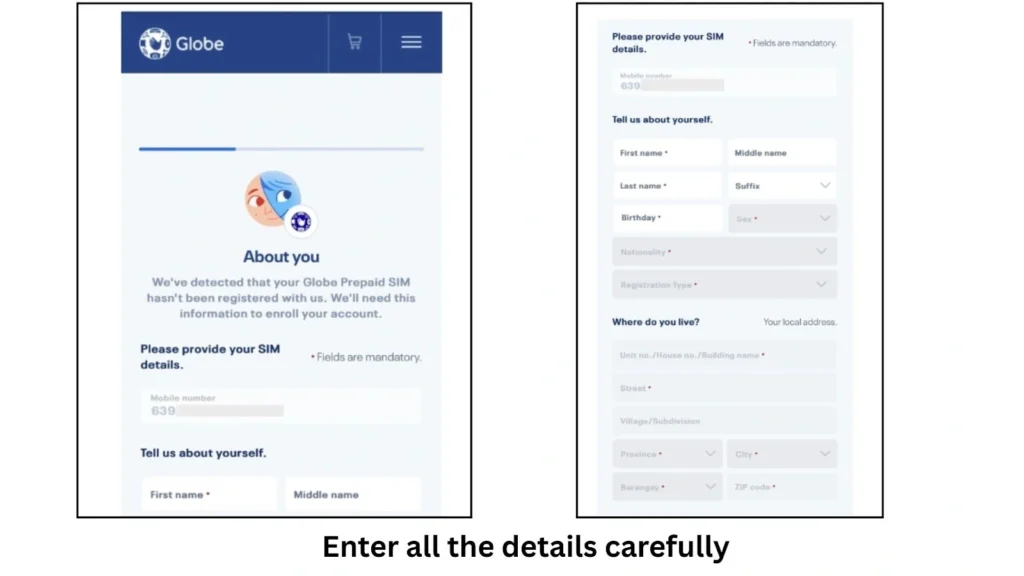
- Take a selfie for face verification. Make sure that your whole face is clear.
- Now select the ID type from the available options and click “attach” to upload the ID. Make sure that the image size is not larger than 2MB.
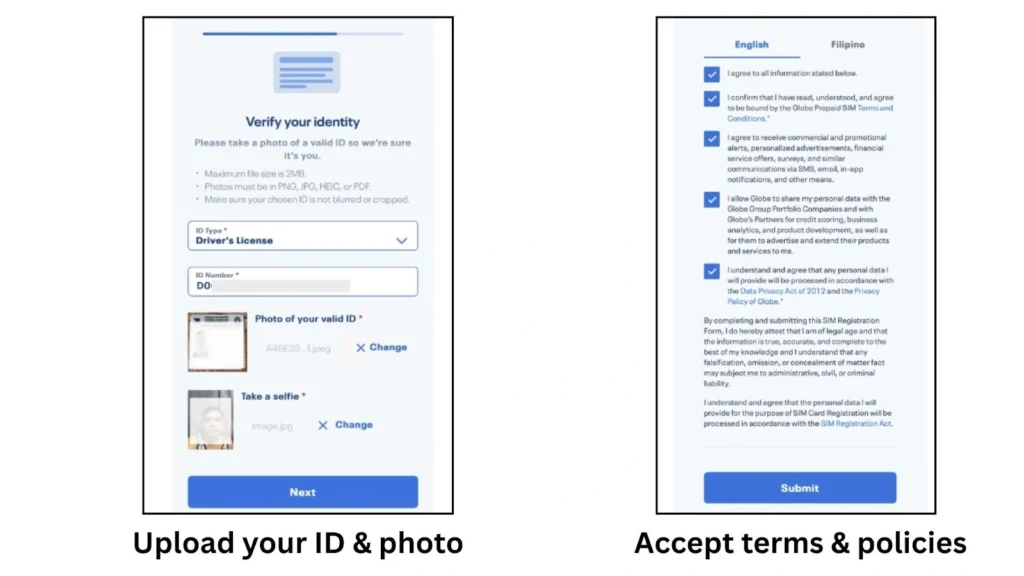
- Read the privacy policy carefully and tick the box to agree to it.
- Lastly, click on the “submit” button to finish the registration.
- You will get a reference number on successful submission. Save the number as proof of registration.

Register Globe SIM Via App
You can also use the GlobeOne app for SIM registration. Here is the step-by-step guide for GlobeOne app SIM registration:
- First of all, download the GlobeOne app on your mobile phone.
- Once downloaded, open the app, register your account, and log in.
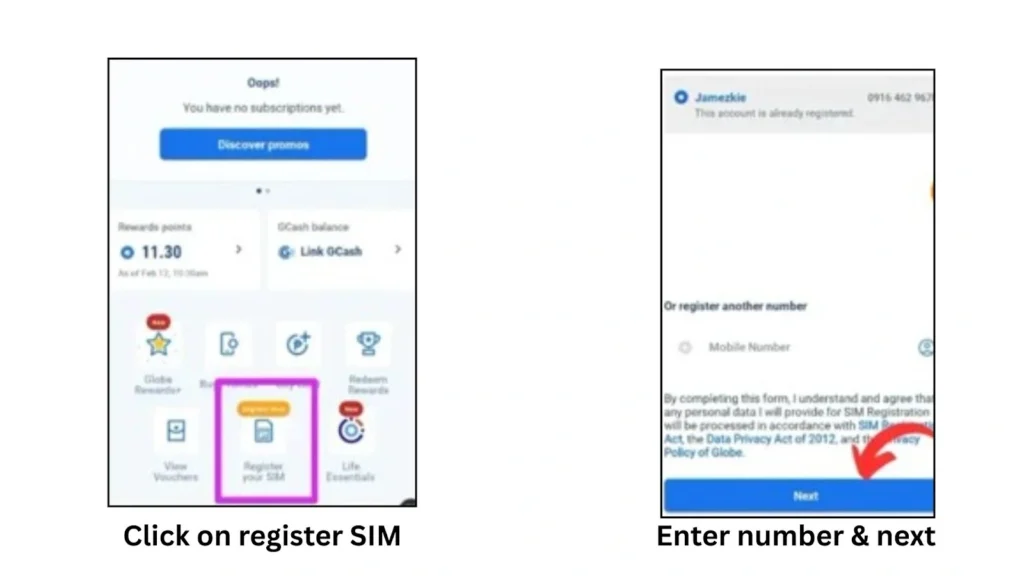
- On the home screen of the app, you will get the “register your account” option. Click on that option to start registration.
- Now, enter your 11-digit Globe SIM number carefully in the required field and click “next”. Always enter the accurate number to receive OTP.
- You will get an OTP on your mobile number. Enter the OTP to complete the number verification.
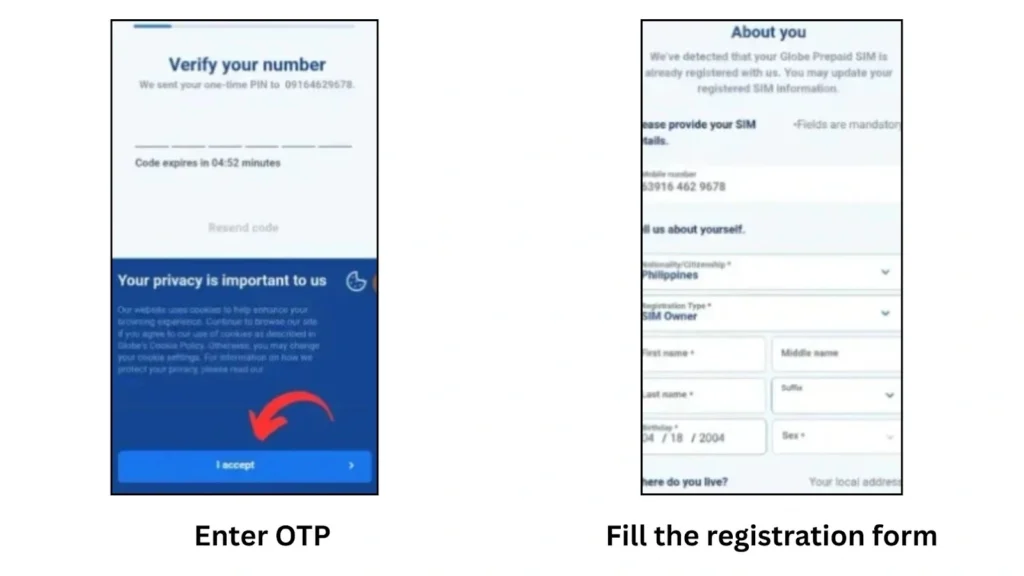
- Now you will get a registration form. Fill the form with all the required details according to your official documents. Your registration will be rejected in case of provide inaccurate details.
- Now take a clear selfie of your face for face verification.
- Choose a type of ID, and click the “attach” option to upload the ID. Always upload files of less than 2MB in size.
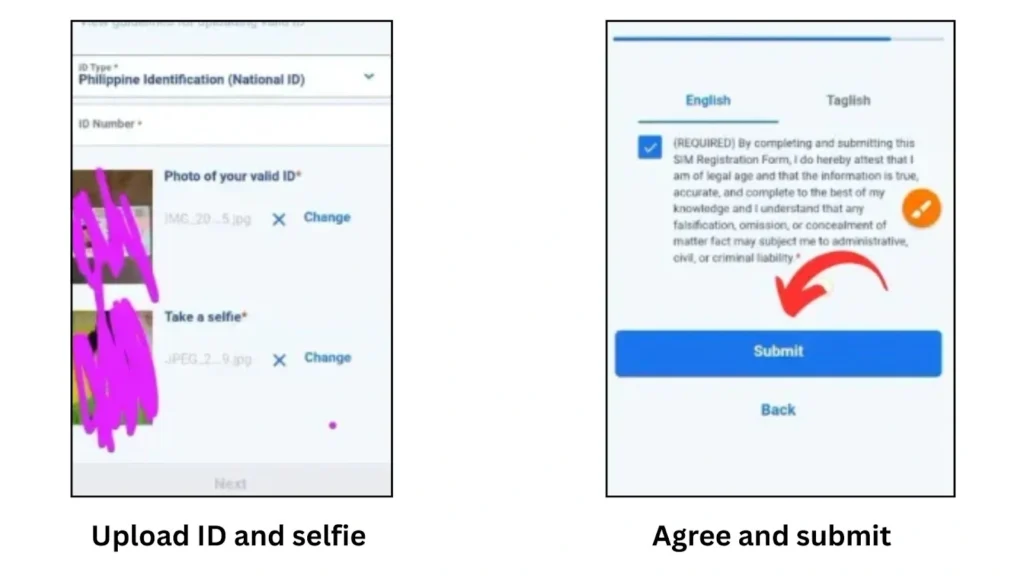
- Review the terms and contains carefully and tick the box to agree to the terms and conditions.
- Once done, click on the “submit”. You will get a reference number for a successful submission. Save the number or take a screenshot as proof of SIM registration.
SIM Registration In Globe Store
If you prefer personal help, visiting a nearby Globe store is a great option. The staff will guide you through each step smoothly and quickly. Just come prepared with your official ID and required documents.
- Go to your nearest Globe store for SIM registration assistance.
- Bring your official ID and any documents needed for registration.
- Store staff will help you fill out the registration forms.
- They will verify your identity and details on the spot.
- Once everything is complete, your SIM will be registered hassle-free.
You can register your SIM using any of the methods mentioned above. But speaking from my experience as a regular Globe SIM user, I always prefer registering through the portal. It’s simple, straightforward, and you can complete it anytime, anywhere.
How To Register a Globe Postpaid SIM?
The process of Globe postpaid SIM registration is a bit different from that of prepaid registration. Here is how you can register your postpaid SIM card:
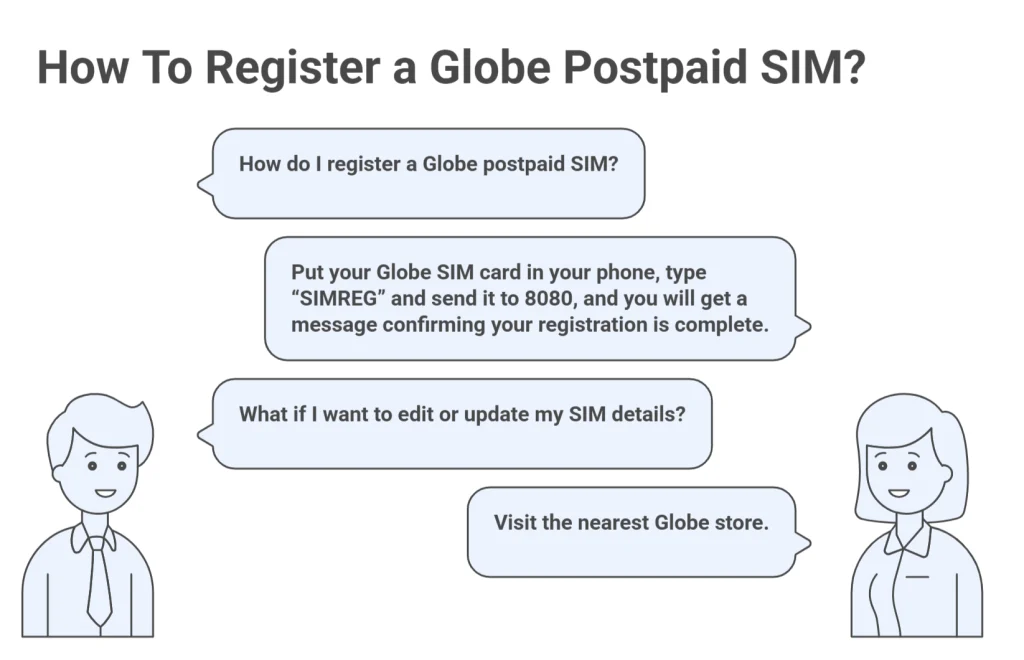
Step 1. Put your Globe SIM card in your phone. Globe will send you a message to check your registration details.
Step 2. Type “SIMREG” and send it to 8080 to confirm your information.
Step 3. You will get a message telling you that your Globe SIM registration is complete.
Step 4. If you want to edit or update the details linked to your SIM, visit the nearest Globe store.
Globe SIM Registration Verification
Check your Globe registration status easily to confirm if your SIM is registered and active. Follow the steps below to verify quickly and avoid any service issues:

Check Status via portal
Here is how you can verify your registration online via Globe Portal:
Check via GlobeOne App
Follow the below given steps below to check the status online through the app:


Check Via Globe Registration Number
If you are facing trouble with online verification, you can verify through the number. Here is how to do it:
Globe Registration Rewards
Globe Telecom encourages SIM registration to promote the SIM Registration Act. Here are the rewards details and how you can avail it:
- You will get 5GB of all-access data and unlimited all-net texts for 3 days as a welcome gift when you successfully register your SIM.
- By registering online, you also earn 10 extra Rewards Points that you can use to enjoy more promos and discounts. Check the Globe SIM balance to confirm that you have received the registration reward.
Requirements For SIM Registration Globe
To register your SIM successfully, you need to meet a few important requirements. Make sure you have all the necessary documents ready. Here’s the complete list to help you register smoothly and without any hassle.

Acceptable IDs For Registration
Here is the list of acceptable IDs to register a Globe SIM card. You must provide one of these IDs to register your SIM.
Edit Your Globe SIM Details
You can update your SIM details at any time to keep your information accurate and up to date. Below is the detailed guide about when and how to edit your SIM card details easily.
When To Edit
Update your details when:
- Changed your name
- Moved to a new address
- Uploaded the wrong ID
- Made a mistake with your birthday
- Entered the wrong mobile number
Edit online
- Open the Globe SIM official GlobeOne app/ portal and log in to your account.
- You will get “change your details” under the “enter mobile number”. Click on that option.
- Click the “update details” button to open the page where you can change your personal information.
- Make the changes you want, then press the “submit” button to save your updates.
In person Option
Can’t update online? Here’s what to do:
- Go to the nearest Globe Store.
- Bring your valid ID and mobile number.
- A Globe rep will fix or verify your details for you.
How To Switch To Globe?
You can switch to Globe network by keeping your old mobile number. It is possible via mobile number probability. Here is how to do it:
- Send USC to 5050 from your current SIM. You’ll receive a 9-digit code .
- Go to Globe’s porting page and fill out the form using your number and USC.
- Globe will deliver a free SIM card to your address.
- Insert the new SIM, choose “Port In”, enter your number and porting code, then restart your phone.
- Now you will become the Globe user officially by keeping your existing number.
Reward
The Globe Telecoms offer a 20GB reward for switching to Globe using mobile number probability. Here is he to claim the reward:
- Insert your Globe MNP SIM into your phone and power it on to begin activation.
- Complete activation by using your SIM by sending a text, turning on mobile data, or checking your balance.
- Open the GlobeOne app and claim your free Go59 promo (5GB data + unlimited all-network texts valid for 3 days).
- Load or spend at least ₱300 each month to receive a FREE Go59 promo, available for up to 3 months after activation.
Troubleshooting The Common Registration Errors
During online Globe SIM registration, you might encounter some common errors. But don’t worry, you can easily fix these issues with a few simple steps. Below, I’ve shared proven solutions that work every time:
OTP Not Received
This is the most common issue that occurs while SIM registration on Globe online. However, this is not a big issue and can be resolved within a few simple steps:
- Make sure that you have entered the accurate mobile number.
- Check the spam folder of your inbox. Sometimes, the system considers OTP as spam SMS and sends it to the spam folder.
- Always ensure that your device has a stable internet connection. Check Globe APN for good Internet
Selfie Issue
Selfie-related issues usually happen when the selfie guidelines are not followed properly. To help you avoid these problems, here are the important guidelines to keep in mind:
- Always upload a selfie of your whole face.
- Make sure that your face is not covered.
- Avoid using any filters and effects in the selfie.
Details Verification Failed
The system usually fails to verify the details in case of providing the wrong details. Always keep the following points in mind while filling out the Globe registration form:
- Always provide the details according to the official documents. Avoid using your dummy name.
- Double-check the details before submitting the form to ensure accuracy.
SIM Already Registered
Sometimes the system shows “SIM already registered error on the newly purchased SIM. It is totally a system fault. You can resolve this issue by taking these steps:
- Make sure that the number you entered is correct.
- Contact the Globe helpline and report your issue. The helpline will provide you with a possible solution.
Benefits Of Globe SIM Card Registration
Registering your Globe SIM card offers many benefits. It helps protect your account, ensures uninterrupted service, and allows you to access exclusive promos and offers. Here’s why every user must register a Globe SIM.
- As you know, the Philippine government has passed the SIM Registration Act, and every SIM user must obey the rule. Registering your SIM ensures you follow the country’s regulations and avoid any issues.
- Once the SIM is registered, the user gets access to exclusive promos and offers. You can activate any promo you want. You can also avail various offers and discounts.
- You can call landline using Globe in Philippines and throughout the world.
- Registration activates the SIM and ensures continuous access to calls, texts, data, and financial services like GCash. While unregistered SIMs remain unactivated until registration.
- The Globe customer support is available for registered users. You can reach out to the customer support anytime in case of any issue.
- Registering your SIM means your number is linked to your real info. This helps keep your account safe and stops others from using it without your permission. It makes your phone number more secure.
- You can officially use the importent app and services such as GCash. Click here to check how to convert Globe load to GCash.
Globe Customer Support
Globe Telecom offers 24/7 professional customer support to its users. You can contact the helpline in case of any issue. Here are the helpline details you can contact anytime to get a solution to your issue:
Helpline Number
211 (from Globe SIM)
(02) 7730-1500 (landline)
808 (from TM mobile)
Online Support
Download the official GlobeOne app to access the official Globe helpline online.
FAQs
Conclusion
Registering your Globe SIM card is simple and important for uninterrupted calls and internet. The SIM registration ACT also made it mandatory to register your SIM. You can register online, through the GlobeOne app, or at a Globe store by providing your details, valid ID, and a selfie for verification.
Online Globe SIM registration via Globe One app is one of the best and mostely used method for SIM registration. However, if you need personal assistance, visit the Globe customer service center.
The Globe Telecoms also offers several rewards on successful SIM registration. In short, SIM registration is important for smooth connection. Contact the Globe helpline or visit the service center in case of any issue.